
When a post keeps getting views after its first week, it can still move your daily numbers even though it no longer appears in a seven-day post list. Postbean separates those views of the data. The chart shows activity recorded during the selected period. The table shows posts published during that period and the metrics collected for each one. Start with the chart if you want to know when activity picked up. Start with the table if you want to know how a particular post did.
Analytics is in beta and collects post metrics from Facebook, Instagram, Threads, Bluesky, and YouTube. The publishing queue covers a broader set of channels. A channel can be available for publishing without supplying metrics to this dashboard.
Get to the numbers for one channel
- Open Metrics in your workspace, then select Analytics.
- Use Select channels to keep the accounts you want to see. Start with a single account if you’re checking a change to its content. Select multiple accounts if you want their combined numbers.
- Pick 7D, 30D, or 90D. The dashboard starts on 30 days. The shorter view is useful when you’re checking what happened around a specific release; the longer view gives you more days to work with when you post less often.
- Choose a metric above the chart, then check the post table below it. The buttons reflect the metrics available in your selection. Change the channel or date range if you need to narrow down what you’re looking at.
If there’s a comparison beside a total, it’s against the immediately preceding period of the same length. On the seven-day view, that means the previous seven days, not this week last year. There’s no previous-period comparison on 90D.
See it in the app
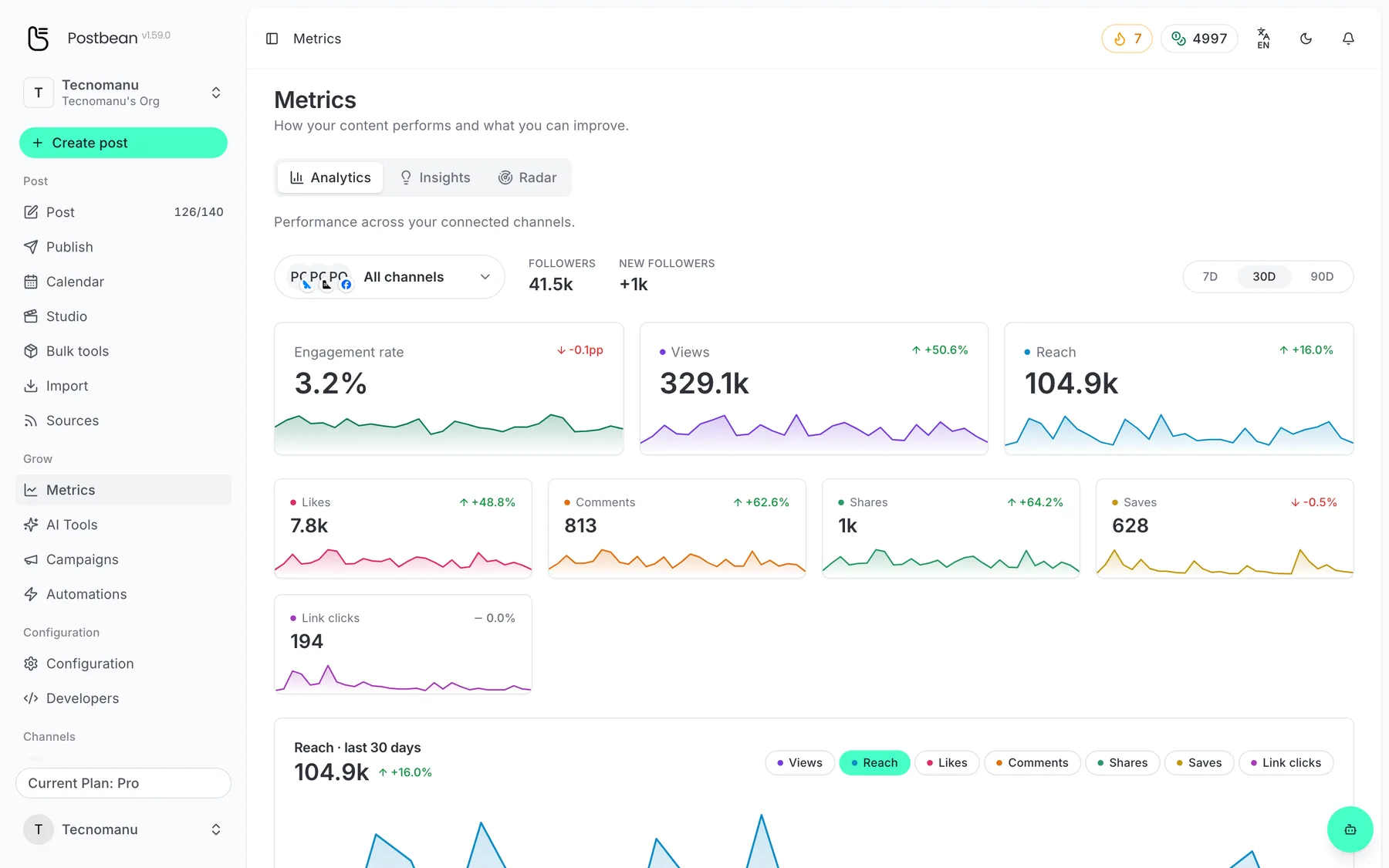
How your posts perform, per network.
Metrics per post and per network.
Which numbers should you compare?
For a video series, you might look at views first, then at comments on the individual posts. For a tutorial people might revisit, look for saves if your selected channel reports them. Depending on the network and the data collected, the dashboard can show views, reach, likes, comments, shares, saves, and link clicks. Follower counts can appear when those numbers are available too.
Postbean calculates engagement rate as recorded interactions divided by views. Interactions include likes, comments, shares, saves, and link clicks where reported. If there are no views in that calculation, the dashboard displays zero for the rate. On a channel without view counts, that zero doesn’t tell you whether anyone interacted. Look at the individual metrics the channel does report.
A combined view adds available activity from the selected accounts; it doesn’t identify the same viewer on two networks. Before treating one channel’s results as better than another’s, check that both report the metric you’re comparing. For a recurring check, keep the same account selection and range so a change in coverage doesn’t look like a change in performance.
When a post or channel is missing
A newly connected account may not have collected data yet. Network metrics aren’t live, and not every network reports every field. The table only includes published posts with collected metrics in the selected publication-date range. Widen the range if you’re looking for an older post; if the channel doesn’t have a metrics integration, switching ranges won’t make that data available.
If you published directly on a supported network before using Postbean, pull recent posts and save the ones you want to history. Do that before checking the table for those posts: pulling them into the import list alone doesn’t add them to the publishing history. You won’t get a complete archive or an exact reconstruction of daily activity from before Postbean started collecting data.
Create a Postbean account to connect your channels and start tracking the posts you publish.
Related reading
Frequently asked questions
Which networks does Postbean collect metrics for?
Facebook, Instagram, Threads, Bluesky, and YouTube. The available metrics depend on what each network returns.
Does Analytics update in real time?
No. Postbean checks for updated post metrics on an hourly schedule. When a number appears still depends on what the network returns.
Can I include posts I published outside Postbean?
Yes, if you pull them from a supported connected channel and save them to history. They can appear in Analytics once there are metrics and they fit the selected view.
Why is there no comparison for the 90-day range?
The dashboard gets 90 days of data, so it does not have another 90-day period to compare against.